Johann N. Löfflmann • computer scientist
Welcome to my private homepage • computer scientific subjects and more
My Software Projects
I am the inventor, main developer and the project lead of the following software projects.
Active software projects
Larger projects lead the list in this section.NumericalChameleon

More than an unit converter - a NumericalChameleon! The version 2 supports more than 5200 units in 93 categories with a precision of up to 1000 decimal places, including not only all important physical units in categories like length, area, volume, electricity, magnetism, force, power, energy, pressure, mass, temperature, velocity, acceleration, radioactivity, fuel consumption, time, etc. but also useful units in non-standard categories like exchange rates, time zones, numbers and time in words (literally and by audio), roman numerals, geographic coordinates, radixes, fractions, checksums, bits&bytes, screen resolutions, colorcodes, unicodes, international dial codes, calendar and holiday calculations and many more.
Audience: all users
User-Interface: intuitive, graphical user interface
Freedoms: Free Software, Open Source, free of charge
Operating System: cross platform (GNU/Linux, Microsoft Windows, OS X)
Implementation: Java
Website: http://NumericalChameleon.net
Jacksum

"Java Checksum". Jacksum is software for computing and verifying checksums, CRCs and message digests (known as hash values and fingerprints). Free Software, Open Source, and platform independent.
Audience: software developers, computer scientists and safety-conscious users
User-Interface: command line resp. integration at your file browser; developers can use it as a library
Freedoms: Free Software, Open Source, free of charge
Operating System: cross platform (GNU/Linux, Microsoft Windows, OS X)
Implementation: Java
Website: https://jacksum.net
XML-holidays

The XML-holidays project suggests an open source standard how to formulate international holidays in XML and it provides actual holidays definitions for many countries.
Audience: software developers
User-Interface: n/a
Freedoms: Free Software, Open Source, free of charge
Operating System: all platforms
Implementation: XML, DTD, i.e. computer language independent
Website: https://github.com/jonelo/xml-holidays
BigAl

With BigAl you can calculate really BIG numbers with an accuracy your desktop calculator is still dreaming of. The only restriction is the power of your computer! Free Software, Open Source, and platform independent.
Audience: mathematicians, computer scientists, software developers and those who love numbers
User-Interface: command line interface
Freedoms: Free Software, Open Source, free of charge
Operating System: cross platform (GNU/Linux, Microsoft Windows, OS X)
Implementation: Java
Website: https://johann.loefflmann.net/en/software/bigal/index.html
bash berries
bash berries is a collection of tiny scripts written in bash.
Audience: users, developers and sysadmins of GNU/Linux and Unix-systems
User-Interface: command line
Freedoms: Free Software, Open Source, free of charge (Apache 2 license)
Operating System: GNU/Linux and Unix-Systems
Implementation: bash
Sourcefiles: 6
Lines of Code: 443
Website: https://github.com/jonelo/bashberries
Jarfix

If you double click on a jar file, and your Java application does not start, your .jar association has been hijacked. On Windows, you can fix the problem with Jarfix.
Audience: Windows users who want to run Java applications, but are not able to do so anymore
User-Interface: very simply user interface and an optional command line interface
Freedoms: Freeware
Operating System: Microsoft Windows
Implementation: NSIS
Website: https://johann.loefflmann.net/en/software/jarfix/index.html
osxapp_vers

The script called osxapp_vers finds the complete product version and build version of OS X in an
Install*OS X*.app package and prints it
out like the OS X's /usr/bin/sw_vers does for an installed OS X product.Audience: testers, developers, and all who have downloaded OS X or have created a bootable OS X install media using Apple's
createinstallmedia
and don't know the exact OS X version anymore.User-Interface: command line interface
Freedoms: free of charge, Free Software, Open Source (Apache 2.0 Lizenz)
Operating System: Mac OS X 10.6+
Implementation: bash
Website: https://github.com/jonelo/osxapp_vers
Inactive software projects
A few software projects that I implemented in the past and that I want to highlight. The sourcecode for those won't be published.
Later projects lead this list in this section.
SCJD Submission
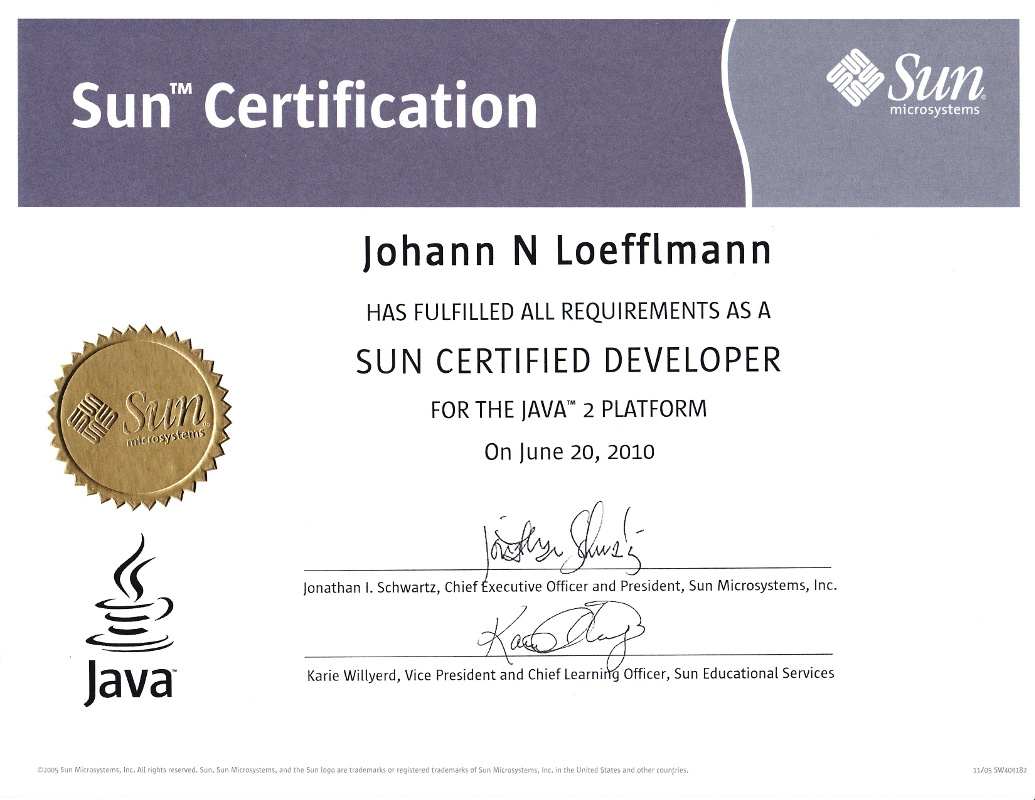
An enterprise server application using a non-relationale database as the backend and network capable clients as the frontend. Developed using Java SE only without any resources of Java EE in order to get the certification called "Sun Certified Java Developer". Submitted in April 2010, received the certificate in June 2010. The "Sun Certified Java Developer (SCJD)" has become the "Oracle Certified Master Java SE Developer (OCMJD)" after the Sun aquisition by Oracle.
Audience: reviewer of the SCJD
User-Interface of the client: graphical user interface
Operating System: cross platform
Implementation: Java 6
Isis and Osiris

Isis is converter of network traffic dumps to a platform independent "MultiProtocolAnalyzer" format. Osiris can read those files and it is an analyzer for multiple network protocols with many unique features and a graphical user interface. During my thesis work at Sun Microsystems in the "Competence Center for Heteregenous Networks" from Juli 1999 to Dezember 1999 both Isis and Osiris have been significantly improved full time.
Audience: Network analysis specialists
User-Interface of the client: graphical user interface (Swing)
Operating System: cross platform (GNU/Linux, Windows, Solaris)
Implementation: Java 1.2
Tumga
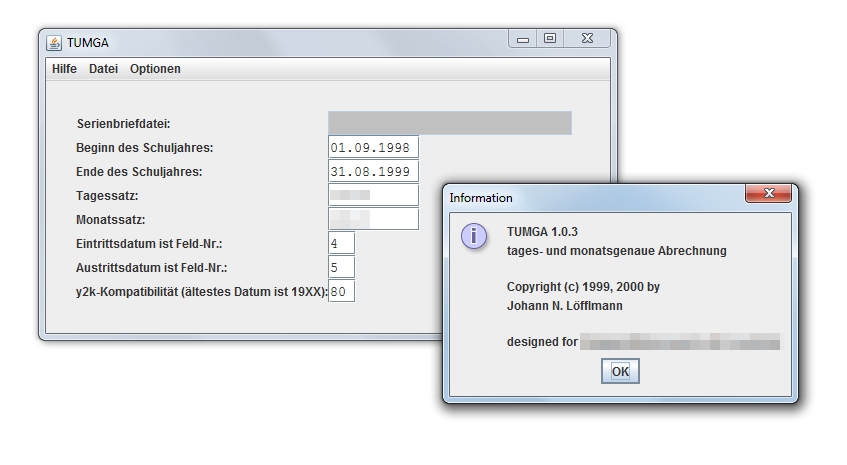
"Tages- und monatsgenaue Abrechnung". Developed in October 1999 for the account staff of an educational institution. Many conditions and Y2K-issue have been taken into account.
Audience: account staff of an educational institution
User-Interface: graphical user interface (Swing)
Operating System: cross platform, installed on Windows only
Implementation: Java 1.2
TIREX
Time Report for Networkx. A time recording system with a classical client/server architecture. Many features for the user and both text based and graphical corporate report features for the management. Tirex have been developed full time during my internship at Sun Microsystems in Munich, Germany from March 1998 to August 1998.
Audience: employees of Sun Microsystems in Munich, Germany
User-Interface: graphical user interface (AWT/Motif)
Operating System: cross platform, installed on Solaris only
Implementation: Java 1.1